Find and replace text in a CSV
To find and replace text in a CSV, open find & replace in Sigmera, pick the column, type what to find and what to replace it with, and choose whether to match case or the whole cell. Preview the result, then download the cleaned file. It all happens in your browser — your data is never uploaded, so it’s GDPR-safe by design.
Last updated: September 2026
Use find & replace free in your workspace
Free account, no credit card — every tool, unlimited rows, 3 free downloads a month, nothing uploaded.
🔒 Everything runs in your browser — your file is never uploaded, and the workspace even works offline once it has loaded.
How to find and replace in a CSV
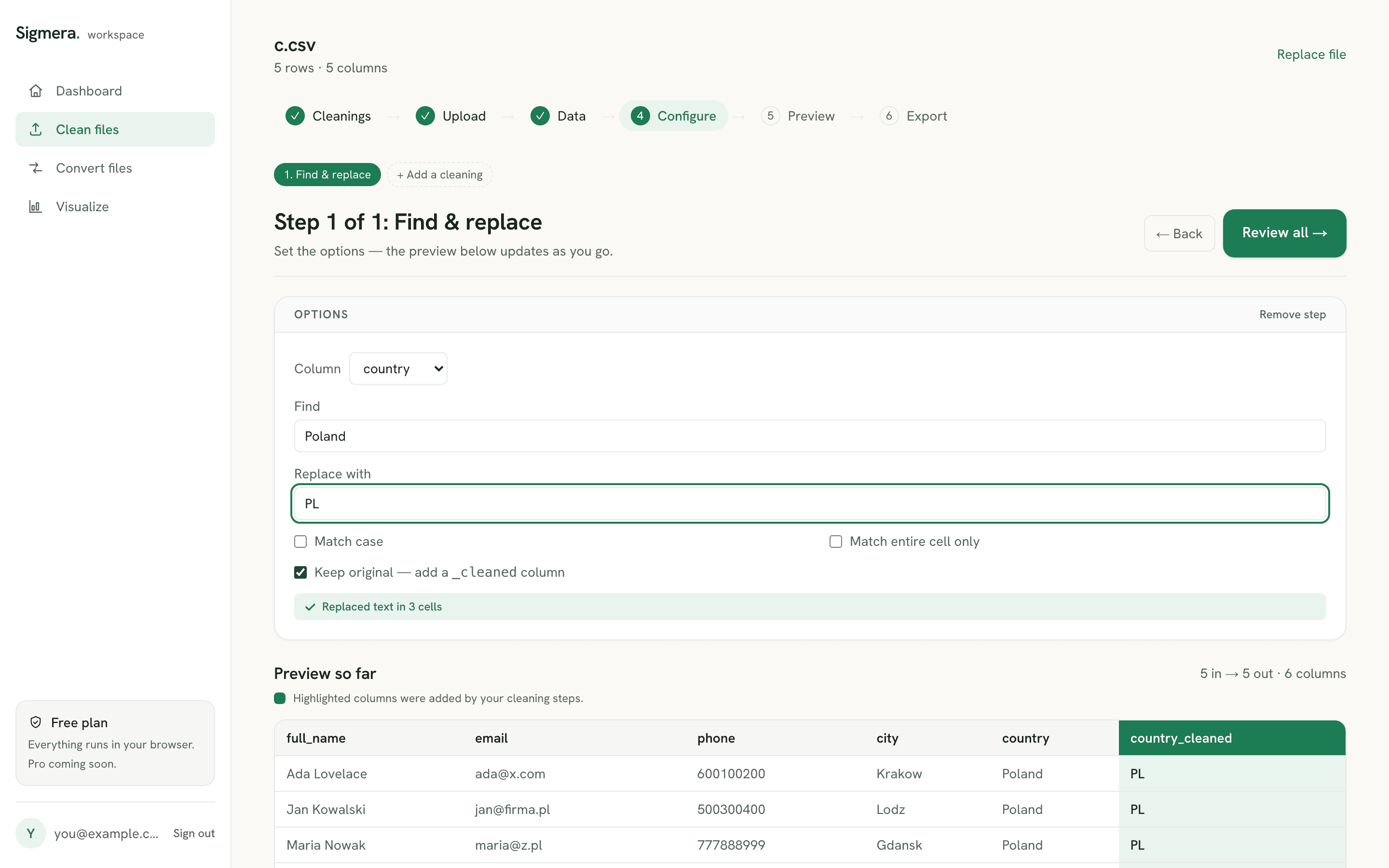
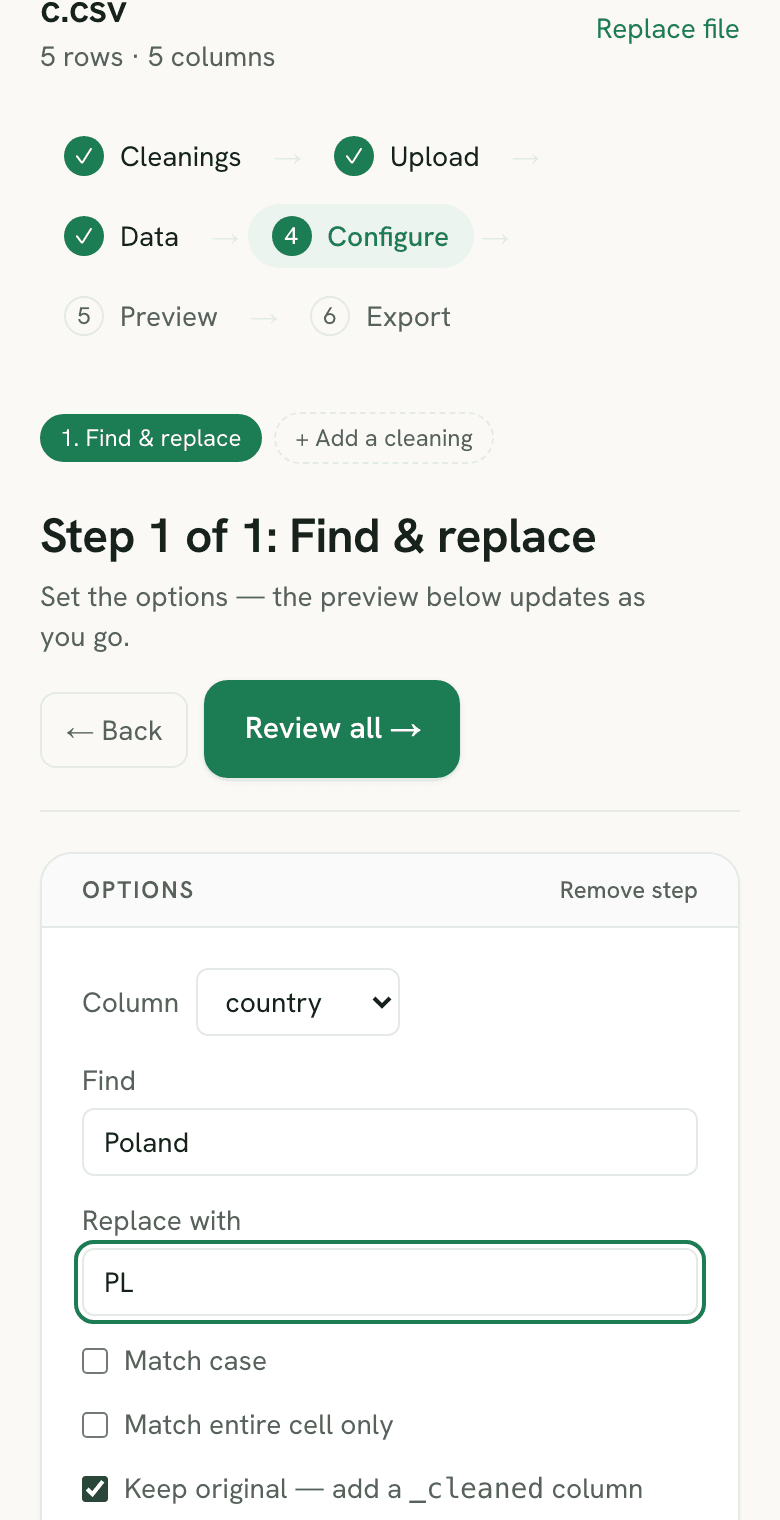
- 1. Open find & replace in your free workspace. Your file is read into the browser’s memory — never sent over the network.
- 2. Pick the column and enter your text. Type what to find and what to replace it with; leave the replacement empty to delete the matches.
- 3. Choose how to match. Optionally match case, match the entire cell only, and keep the original column alongside a new
_cleanedone. - 4. Preview and download. See exactly which cells changed, then create a free account to export the cleaned CSV.
What it matches — and what it will not
Every match here is literal. The text you type is compared character for character, so *, ?, and . mean themselves. Excel takes the opposite approach: its search treats ? as any single character and * as any run of characters, which is powerful when the pattern varies and a hazard when it does not — a replace-all for 12.50 in a wildcard-aware search can reach 12X50 too. Use Excel for a genuine pattern, and use this for text you can name exactly.
Three settings decide how far a replacement travels:
- One column, not the sheet. The replacement is scoped to the column you pick, so swapping “NY” for “New York” in a state column cannot touch a company name in the next column over.
- Match entire cell only. Off, every occurrence inside the cell is replaced. On, the cell changes only when it equals the search text outright — the setting that stops “US” rewriting the middle of “Austin”.
- Match case. Off by default, so
Ltdalso findsLTDandltd. Turn it on when the casing is the thing you are fixing.
Find & replace is the right tool for a known token — a stray Ltd., a currency symbol, a country spelled three ways. It is the wrong tool when the fix is structural. Address columns that need lowercasing and de-spacing belong in the email cleaner, repeated rows belong in the duplicate remover, and if the same swap has to run on a workbook instead, the Ctrl+H walkthrough for Excel covers the wildcard and scope options in full.
When find and replace says “0 replacements”
A search that finds nothing is almost never a broken search. It is usually that the cell does not hold what it appears to hold. Three causes account for most of it:
- An invisible character sits inside the value. Data pasted from a web page carries non-breaking spaces, which look identical to normal ones. Microsoft’s TRIM documentation is blunt about it: TRIM handles the 7-bit ASCII space (value 32), and “by itself, the TRIM function does not remove this nonbreaking space character” (value 160). So
Acme Ltdcan refuse to matchAcme Ltd. Replace the invisible character first — search for the pasted space itself and replace it with a normal one — then run the real swap. - Match entire cell is on when it should not be. With that setting on,
Ltdmatches a cell containing exactlyLtdand nothing else. If the cell readsAcme Ltd, it is skipped and the count comes back zero. - You are searching the wrong column. The scope here is one column by design. That is what stops a country fix from rewriting company names, but it also means a value living two columns over is genuinely out of range. Check the column selector before assuming the text is absent.
Country columns are where whole-cell matching earns its place. A CRM with address picklists accepts one spelling per country, so UK, U.K., and Great Britain each need their own exact swap to the same value — the Salesforce country and state picklist rules explain which spelling to aim for.
Whitespace is common enough to deserve its own pass rather than a chain of replacements — the guide to stripping spaces in Excel covers which ones TRIM catches and which need a targeted swap.
Why Excel can find a value it refuses to replace
There is an asymmetry in Excel’s dialog that catches people out and has nothing to do with their search text. The Look in box offers Formulas, Values, Notes, or Comments on the Find tab — but Microsoft’s documentation states that “only Formulas are available on the Replace tab”. Find can look at what is on screen; Replace can only look at what is underneath it.
That produces the confusing case where a search locates a value and the replace then reports nothing to change. A cell displaying 12.50 may store 12.5, and a cell reading 03/04/2026 stores a date serial, not those characters. Find with Look in: Values matches the display; the moment you move to the Replace tab that option is gone and the search runs against the stored value instead. The text you can see was never the text being searched.
The same rule bites from the other direction. Because Replace always reads formulas, a replace-all for a short token rewrites it inside every formula that contains it — useful when you are repointing a model on purpose, damaging when you meant to correct a label and quietly changed cell references across the sheet.
A CSV has neither layer. There are no formulas and no display formats, so the characters in the file are the characters the search compares, and what the preview shows is what the downloaded file contains. If a column arrives as dates or trimmed numbers, that happened when a spreadsheet opened the file — opening a CSV in Excel without mangling it covers the import route that avoids it.
Find and replace in Google Sheets — and when regex is the answer
Google Sheets sits between Excel and this tool. Its find-and-replace dialog offers “Match case”, “Also search within formulas”, and full regular-expression search, which makes it the better choice when the thing you are replacing is a pattern rather than a value: every four-digit year, any phone number in brackets, every trailing punctuation mark. Excel gives you two wildcards; Sheets gives you the whole regex grammar.
The cost is the round trip. Using Sheets means the file goes to Google Drive first, and for a column of customer names, emails, and phone numbers that is a copy on infrastructure you do not control — which is exactly the transfer a browser tool avoids, because the CSV is parsed inside the tab and never sent anywhere. So the honest split is: reach for Sheets when you truly need a pattern, and use this when the text is known and the data is personal. A middle case worth naming — repeated values that differ only by punctuation or case — is often better fixed by normalizing the casing than by writing an expression, and deduplicating afterwards usually collapses what is left. In a workbook, the same second pass is finding and removing duplicates in Excel.
Doing it in a text editor — and what that quietly breaks
Opening the CSV in Notepad++, VS Code, or a shell one-liner is the obvious move when the file is large and the swap is trivial. It works right up until the search text collides with the format itself, because an editor sees one long string and has no notion of where a field starts or ends.
The CSV spec is what makes that dangerous. RFC 4180 rule 6 says “fields containing line breaks (CRLF), double quotes, and commas should be enclosed in double-quotes”, and rule 7 adds that a double quote inside such a field is escaped by doubling it. So a valid row can read 101,"Acme, Ltd",US — three fields, two commas, and only one of them a delimiter. Three things follow, and each corrupts a file without raising an error:
- Replacing a comma shifts your columns. A file-wide swap rewrites the comma inside
"Acme, Ltd"along with the real delimiters. That row now has four fields instead of three, and every value to the right of it lands in the wrong column when the file is next imported. - Replacing a quote character destroys the escaping. Swap
"for an apostrophe and the doubled quotes that were protecting a value stop protecting it. The parser then reads the field boundaries somewhere else entirely, usually swallowing the rest of the line. - A line in the editor is not a row. Because a quoted field may contain a line break, one record can span several editor lines. Any regex anchored to
^or$— a per-row fix, a first-column-only replacement — then matches in the middle of a record.
Replacing at the field level sidesteps all three. The file is parsed into rows and columns first, the swap is applied to the values inside one column, and the export re-quotes anything that needs it, so the column count cannot move. That is also why a comma is a safe thing to search for here and a hazardous one to search for in an editor. If the delimiter itself is the problem — a semicolon-separated export from a European locale, say — re-exporting the file as comma-separated UTF-8 fixes it at the source rather than one character at a time, and what a CSV actually stores covers the quoting rules in full.
Frequently asked questions
- Does this tool upload my CSV file?
- No. Find & replace runs entirely inside your web browser using client-side JavaScript. Your file is never uploaded to a server and never leaves your device, so it is GDPR-safe by design.
- Can I match the whole cell or just part of it?
- Both. By default it replaces every occurrence of your text inside a column. Tick 'Match entire cell only' to replace a cell solely when it equals your text exactly, and 'Match case' to make the search case-sensitive.
- Can I delete text instead of replacing it?
- Yes. Leave the 'Replace with' field empty and every match is removed. You can also keep the original column and write the result into a new _cleaned column.
- How is this different from Excel's Find & Replace?
- Excel works on the whole sheet and changes cells in place. Sigmera targets a single column, can keep the original alongside the cleaned value, previews the result before you commit, and runs in your browser with nothing uploaded.
- Does it support wildcards or regular expressions?
- No. The text you type is matched literally, so characters like *, ?, and . stand for themselves rather than acting as wildcards. That is deliberate — it means a search for a price such as 12.50 cannot accidentally match 12X50. Excel does support the ? and * wildcards, so use Excel when the pattern genuinely varies, and this tool when the text is known.
- How do I find and replace in a CSV without Excel?
- Open the CSV in Sigmera, pick the column, and enter the find and replace text. The file is parsed by JavaScript running on your own machine, so you need no spreadsheet app, no install, and no account to preview the result. Because the file is read as plain text, leading zeros and long ID numbers are not reformatted the way a spreadsheet would reformat them on open.
- Why does find and replace say 0 replacements when I can see the text?
- Usually the cell holds a character you cannot see. Text pasted from a web page often carries a non-breaking space (character 160) that looks exactly like a normal space but does not match one — Microsoft notes that TRIM does not remove it either. Replace that character first, then run your swap. The other two causes are 'Match entire cell only' being on when the value is part of a longer string, and having the wrong column selected.
- Why does Excel find a value but refuse to replace it?
- Because the two tabs search different things. Microsoft documents that the Look in box offers Formulas, Values, Notes, or Comments on the Find tab, but that only Formulas are available on the Replace tab. Find can match what is displayed; Replace only ever reads the stored value underneath. So a cell showing 12.50 that stores 12.5, or a date shown as 03/04/2026 that stores a serial number, is found and then not replaced. A CSV has no such second layer — the characters in the file are the characters being searched.
- Can a replace-all damage my formulas?
- In Excel, yes. Because the Replace tab always reads formulas, replacing a short token rewrites it inside every formula that contains it, so a search meant to fix a text label can silently repoint cell references across the sheet. That is a deliberate feature when you are updating a model and an accident otherwise. In a CSV there are no formulas to rewrite, and the preview here shows every affected row before you download.
- Can I replace several different values in one pass?
- Not in a single pass — each find-and-replace runs one pair at a time. Run them in sequence on the same file: the result of each replacement stays loaded in the browser, so you can chain half a dozen swaps and export once at the end rather than re-opening the file between each one.
- Can I find and replace in Google Sheets instead?
- Yes, and Sheets is the better choice when you need a pattern rather than a known value — its dialog supports full regular-expression search, plus Match case and searching within formulas. The trade-off is that the file has to go to Google Drive first. Use Sheets for genuine patterns, and a browser tool when the data is personal and the text is known.
- Can I find and replace in a CSV using Notepad++ or VS Code?
- You can, but a text editor has no idea where the fields are — it sees one long string. RFC 4180 says a field containing a comma, a double quote, or a line break is wrapped in double quotes, so a row can legitimately read 101, “Acme, Ltd”, US — three fields but two commas. A find-and-replace in an editor rewrites the comma inside those quotes exactly like a real delimiter, and the row silently gains a column. For a known token in a known column an editor is fine; for anything touching commas, quotes, or line breaks, replace at the field level instead.
- How do I replace a comma inside a CSV without breaking the columns?
- Work on the parsed file rather than the raw text. Pick the column, search for the comma, and replace it — the change lands inside that field’s value, and the file is re-quoted on export so the column count never moves. Doing the same swap in a text editor cannot distinguish a comma inside a quoted value from a comma that separates two fields, which is why that route shifts every column to the right of the change.
- Does replacing text change my original file?
- No. The file on your disk is untouched. The replacement happens on a copy held in the browser's memory, and you get a new file only when you export. Tick 'Keep original column' and the cleaned values are written to a separate _cleaned column so you can compare the two side by side before committing.