Clean an email column in a CSV file
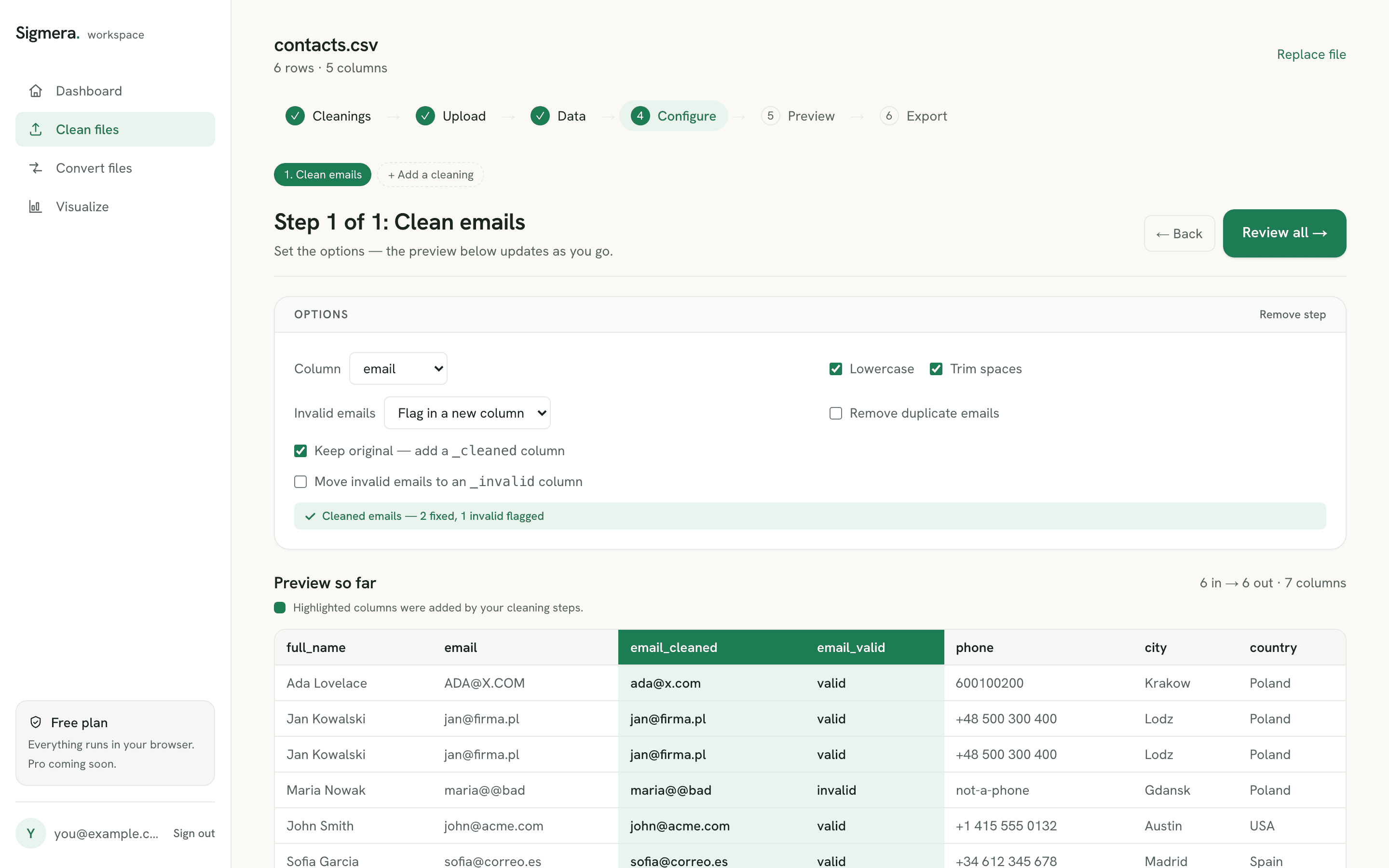
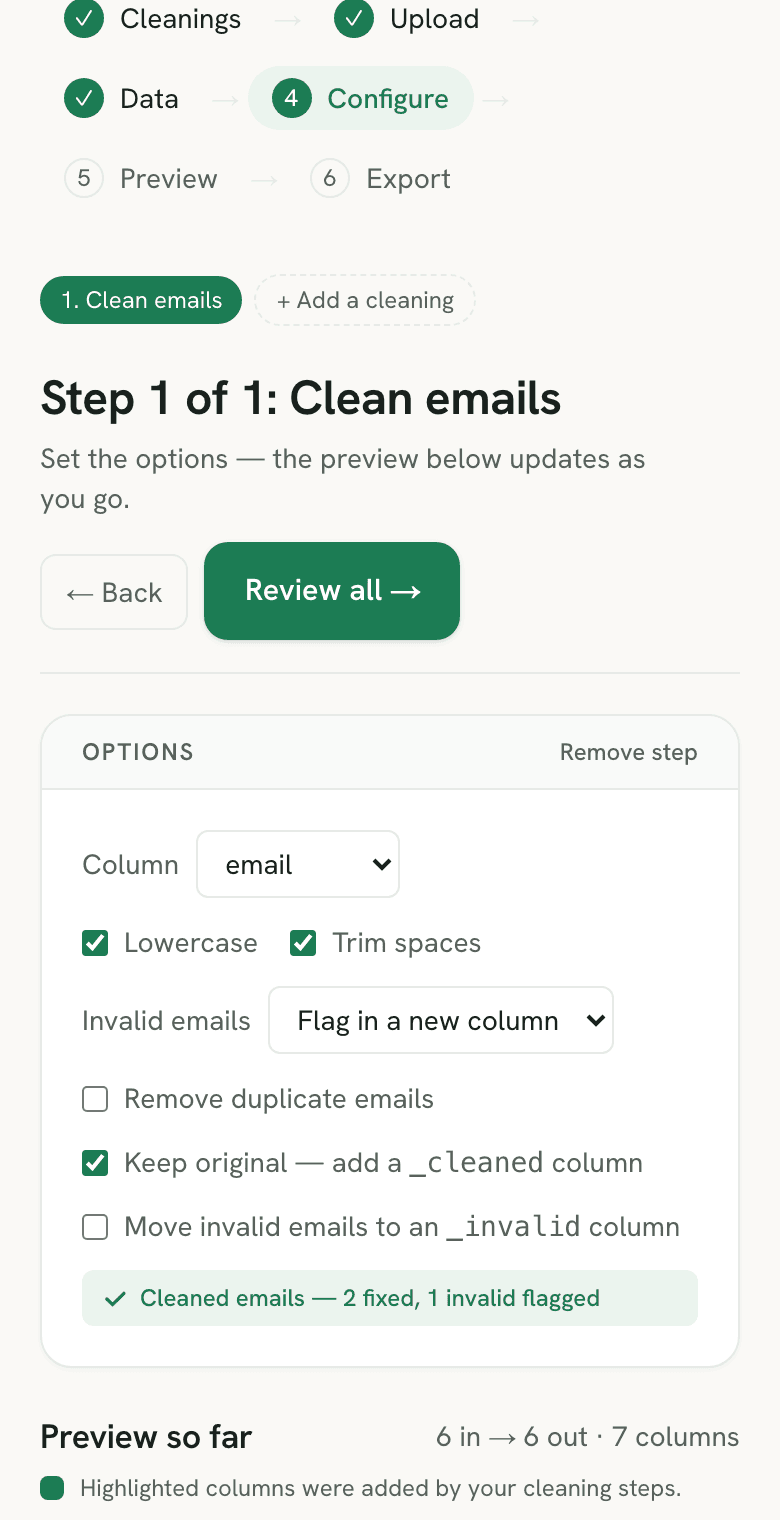
To clean an email column, open the email cleaner in Sigmera, choose whether to lowercase and trim each address, then flag invalid emails in a new column or remove those rows entirely. Preview the result and download the cleaned file. Sigmera runs entirely in your browser — your email list is never uploaded to a server, so it’s GDPR-safe by design.
Last updated: September 2026
Use the email cleaner free in your workspace
Free account, no credit card — every tool, unlimited rows, 3 free downloads a month, nothing uploaded.
🔒 Everything runs in your browser — your file is never uploaded, and the workspace even works offline once it has loaded.
Ways to clean an email column, compared
| Method | Data uploaded? | Validates format | Skill needed |
|---|---|---|---|
| Sigmera (this tool) | No — runs in browser | Yes (syntax) | None |
| Email-verifier services | Usually yes — your list goes to their servers | Yes (+ deliverability) | Low |
| Excel / Google Sheets | No | Only with formulas | Medium (formulas) |
| Python / pandas | No | Yes (regex) | High (code) |
Note: many email-verifier services require you to upload your list to their servers to check it — a privacy and GDPR concern Sigmera avoids entirely by working in your browser.
How to clean an email column
- 1. Drop your CSV into the tool. The file is read into your browser’s memory — it is never sent over the network. Sigmera auto-detects the email column.
- 2. Choose how to clean. Lowercase addresses, trim stray spaces, and decide whether to flag invalid emails in a new column or remove those rows. Optionally dedupe at the same time.
- 3. Preview the result. See how many addresses were fixed, how many were invalid, and how many clean rows remain before you commit.
- 4. Download the clean file. Create a free account to export the full cleaned CSV.
Why validate emails client-side?
Email lists exported from sign-up forms and CRMs are full of stray capitalization, leading spaces, and typo’d addresses that break imports and bounce campaigns. Sigmera checks each address against the basic shape defined by RFC 5322 — a local part, an @ sign, a domain, and a dot — entirely in your browser’s JavaScript engine. Because there is no server to upload to and nothing is stored, this satisfies GDPR data-minimization (Article 5): zero bytes of your contact list leave the device. Note that a format check confirms an address is well-formed, not that the inbox actually exists.
Remove duplicate emails: what counts as a duplicate
Sigmera compares addresses case-insensitively after the clean, so Sam@Acme.com and sam@acme.com collapse into one row on their own — the lowercase switch changes what lands in the downloaded file, not what counts as a match. Turn trimming on as well and the same address carrying a stray leading space joins them: whitespace is part of the value the dedupe reads, where letter case is not. The first occurrence is kept and every later copy is dropped, and the preview tells you how many rows went.
Two lookalikes are deliberately left alone, because they are different strings and only some mail providers route them to the same inbox. A subaddressed value like sam+news@acme.com splits into a user part and a detail part rather than being a separate account (RFC 5233), and sam.jones@acme.com versus samjones@acme.com behaves the same way. Collapsing them for you would silently merge contacts that other providers keep apart. If you want them merged, strip the tag with a find and replace on the email column first, then dedupe.
Dedupe here is column-level: it looks at the email and nothing else. To drop rows that repeat across several fields — name plus company, say — reach for the duplicate row remover instead. A contact list usually needs the phone column standardized in the same pass, which is what the E.164 phone number formatter handles on the same file. The spreadsheet route is covered step by step in the Excel duplicates guide, and the wider Excel cleanup routine covers the casing and whitespace passes that belong in the same sitting. If this file is headed straight into a CRM, prepping a customer list for a Salesforce data import puts the email clean and the dedupe in the right order, and the HubSpot import walkthrough covers what that CRM does with an address it cannot key on. For a candidate list rather than a customer list, cleaning an applicant CSV before an ATS import uses the same email pass as the key for matching repeat applicants.
Is Sam@acme.com really the same address as sam@acme.com?
By the letter of the standard, not necessarily. RFC 5321 §2.4 puts the domain half of an address under normal DNS rules, which are not case sensitive, but says the local part — everything before the @ — must be treated as case sensitive, and that a host may therefore hold smith and Smith as two different users. The same paragraph then says that exploiting this impedes interoperability and discourages it.
Practically nothing you will meet does it. Mail providers fold the local part to one case, which is why matching case-insensitively is the right default when you remove duplicate emails from a contact list: a sign-up form collects one address in four spellings, and all four belong to one person. Sigmera takes that default and does not expose a switch for it.
The cost of the default is worth stating plainly. If a list came off a legacy host that really does route Smith@ and smith@ to separate mailboxes, the dedupe will merge two real contacts and nothing in the tool will stop it. Check the export before you run it, and if that risk is live, flag invalid rows instead of removing them and sort the column by hand.
When the file has more than one email column
CRM and sign-up exports often carry email plus a work_email or email2 that was filled in on some rows and not others. Dedupe reads one column, so running it twice — once per column — does not catch the case you actually have: a contact whose address sits in the first column of one row and the second column of another passes both passes untouched. Collapse the two into a single column before you dedupe.
Pick which address wins per row first — for a B2B list that is normally the work address — then merge the two fields with the column joiner and clear the leftover separator on rows where only one cell had a value with one more find and replace. Trim, lowercase, and dedupe the merged column in the usual single pass after that. The spreadsheet equivalent of the merge step is concatenating two columns in Excel, which costs a formula, a paste-as-values, and a column delete.
One thing the dedupe will not do is choose a survivor for you: it keeps whichever row comes first in the file and drops the rest. A CSV carries no dependable sense of recency, so if the newest record is the one that should live, sort the file by its date column newest-first before loading it — then “first occurrence” and “most recent” are the same row.
Addresses that pass the check but you may not want
A format check answers exactly one question: is this string shaped like an email address? Two kinds of value clear that bar and still cost you on the way out. The tool leaves both in place, which is better to know now than after a send.
Role addresses. RFC 2142 reserves names such as info, sales, support, and postmaster for a function rather than a person, and asks that they be recognised independent of character case. They are valid addresses, so they survive the clean untouched — but a shared inbox is a different thing from a contact, and nobody at the other end opted in personally. Sigmera does not sort addresses by what sits in front of the @. Trim, lowercase, and dedupe first, then sort the cleaned column in a spreadsheet: once the casing is consistent the role addresses land together and the block goes in one pass.
Misspelled domains. gmial.com has a local part, an @ sign, a domain, and a dot, so it is well-formed and the validator passes it. It will still bounce. Nothing that inspects syntax alone can tell the difference, and Sigmera never contacts a mail server to check — which is the same reason the list never leaves your device. Where you already know the misspelling, correcting it across the file is a single find and replace on the email column. Where you do not — a long tail of one-off typos across thousands of rows — the job is clustering rather than replacing: group the addresses that look alike, then read each proposed match yourself before treating two spellings as the same domain. Sigmera does not cluster, and no amount of syntax checking stands in for that review. The rest you learn about from bounce reports, which is what a verifier that connects to mail servers sells — at the cost of uploading the list to it.
Email-list cleaning is not mailbox verification
Cleaning an email list removes formatting inconsistencies and repeated addresses. Mailbox verification asks whether an address can receive mail. Sigmera handles the local cleanup; it does not contact mail servers, establish consent or promise inbox delivery.
- Normalize before matching: trim surrounding whitespace, apply your casing policy, check the format, then deduplicate. Review flagged rows before dropping a contact that may be fixable.
- Do not silently remove plus tags or rewrite domain typos. ada+news@example.com may be intentionally different from ada@example.com; an apparent typo can also be a real domain.
- Separate invalid syntax from stale contacts and unsubscribes. A well-formed address may still bounce; retain suppression and consent records outside the cleaning pass.
Choose the method that fits your task
- Sigmera
- Trim, lowercase, check format and remove duplicates before an import. No DNS, SMTP or mailbox-existence verification.
- Excel or Google Sheets
- Manual review and formulas in an existing sheet. A text formula cannot establish deliverability either.
- A mailbox-verification service
- An additional check when you need mailbox-level signals. Addresses leave your device; clean duplicates locally first and review the service's coverage.
Frequently asked questions
- Does this tool upload my email list?
- No. The email cleaner runs entirely inside your web browser using client-side JavaScript. Your file is never uploaded to a server and never leaves your device, so it is GDPR-safe by design. Many email-verifier services, by contrast, require you to upload your list to their servers.
- Does it verify whether the inbox actually exists?
- No. Sigmera checks the format and syntax of each address — whether it looks like a valid email per the RFC 5322 shape (local part, @, domain, and a dot). It does not connect to mail servers, so it cannot confirm deliverability or whether a mailbox is real.
- What counts as an invalid email?
- Any value that does not match the basic email pattern of text, an @ sign, a domain, and a dot — for example a blank cell, a name with no @, or a domain with no dot. After optional trimming and lowercasing, anything that still fails the format check is marked invalid.
- Can I remove duplicate emails at the same time?
- Yes. Turn on “Remove duplicate emails” and the tool drops rows whose email is a case-insensitive duplicate after cleaning, keeping the first occurrence. You can lowercase, trim, validate, and dedupe in a single pass.
- How do I remove duplicate emails from a CSV?
- Open the CSV in the email cleaner, turn on trimming and lowercasing so “Sam@Acme.com” and “ sam@acme.com ” are recognised as the same address, then enable “Remove duplicate emails”. The tool keeps the first occurrence of each address and drops the rest, matching case-insensitively after the clean. Preview the count of removed rows, then download the deduplicated file. It all runs in your browser, so the list is never uploaded.
- How do I clean an email list before importing it?
- Clean an email list in three passes on one screen: trim leading and trailing spaces, lowercase every address, then flag or drop values that fail the format check. Add “Remove duplicate emails” to collapse repeats built up from stacked exports. That covers the exact problems most CRM and email-platform importers reject a file for — malformed addresses, stray whitespace, and duplicates — before the file ever reaches the import tool.
- Why wasn’t sam+news@acme.com removed as a duplicate of sam@acme.com?
- Because they are different strings. Sigmera compares the cleaned address exactly — after trimming and lowercasing — and does not strip subaddress tags or dots from the local part. Some mail providers route both to the same inbox and others do not, so collapsing them automatically would merge contacts that should stay separate. To merge them yourself, run a find and replace on the email column to remove everything between the plus sign and the @ first, then dedupe.
- Does removing duplicate emails delete the whole row?
- Yes. When “Remove duplicate emails” is on, the entire row is dropped, not just the repeated address — the first occurrence keeps all of its other fields. That is what you want before a CRM or mailing-list import, where one row is one contact. If you need to deduplicate on a combination of columns rather than the email alone, use the remove-duplicates tool instead.
- Does the tool remove role addresses like info@ or sales@?
- No. RFC 2142 sets aside names such as info, sales, support, and postmaster for a function rather than a person, and asks that they be recognised regardless of character case. Every one of them is a well-formed address, so the format check passes them and the clean leaves them in place — Sigmera does not classify addresses by what sits in front of the @. If you want them out, trim, lowercase, and dedupe the column first, then sort the cleaned email column in a spreadsheet: with the casing normalised the role addresses group together alphabetically and you can remove the block in one pass.
- My export has two email columns. How do I dedupe across both?
- Dedupe reads one email column at a time, so collapse the columns first. Decide which address wins per row — usually the work address — and build a single column from the two, then run trim, lowercase, and “Remove duplicate emails” on that column. The join-columns tool will merge two fields into one, and a find and replace clears the separator it leaves behind when only one of the two cells had a value. Running the dedupe twice, once per column, does not work: it only removes rows whose *first* email repeats, and a contact whose work address appears in column A of one row and column B of another survives both passes.
- Which duplicate row does Sigmera keep — the first or the newest?
- The first occurrence in file order, every time. There is no “keep the most recent” option, because a CSV carries no reliable notion of recency — a created-at column, if the export even has one, may be sorted any way at all. If the newest row is the one you want, sort the file by its date column newest-first in a spreadsheet before you load it, then dedupe: the first occurrence is then the latest one. Check the sort actually applied to the whole sheet and not just the one column, or the dates and the emails end up on different rows.
- Is the email local part case-sensitive when Sigmera removes duplicates?
- Sigmera always matches case-insensitively, so Sam@acme.com and sam@acme.com collapse into one row whether or not you turn lowercasing on — that switch only changes what is written to the downloaded file. The standard is stricter: RFC 5321 §2.4 treats the domain as case-insensitive under DNS rules but says the local part must be treated as case-sensitive, while discouraging anyone from relying on that because it breaks interoperability. Real mail providers fold the local part to one case, so case-insensitive matching is what a contact list needs. Trimming, not lowercasing, is the switch that affects matching: a stray leading space is part of the value the dedupe reads.
- Will it catch a misspelled domain like gmial.com?
- No. A misspelled domain is still a valid address shape — a local part, an @ sign, a domain, and a dot — so it passes the format check and then bounces on send. No syntax check can catch it, and Sigmera never connects to a mail server to look. When you already know which misspelling the file carries, a find and replace on the email column corrects every affected row at once. The ones you do not know about will only show up as bounces in whatever platform you send from.