Convert XLSX to CSV
To convert Excel to CSV, open the converter in Sigmera, drop your .xlsx or .xls file, pick the sheet if there’s more than one, and download a clean UTF-8 CSV. It all happens in your browser — your file is never uploaded to a server, so it’s GDPR-safe by design and works without Excel installed.
Last updated: September 2026
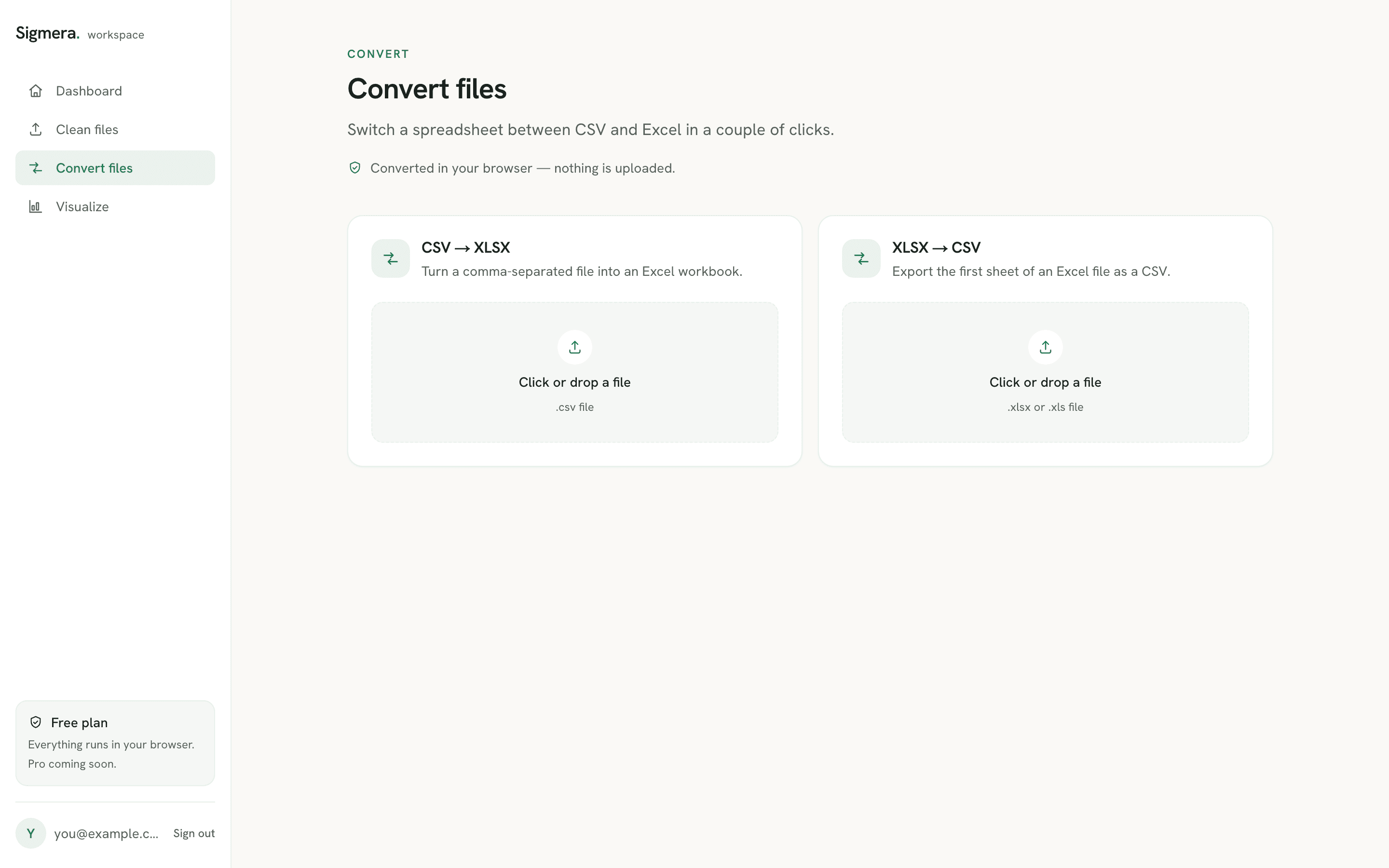
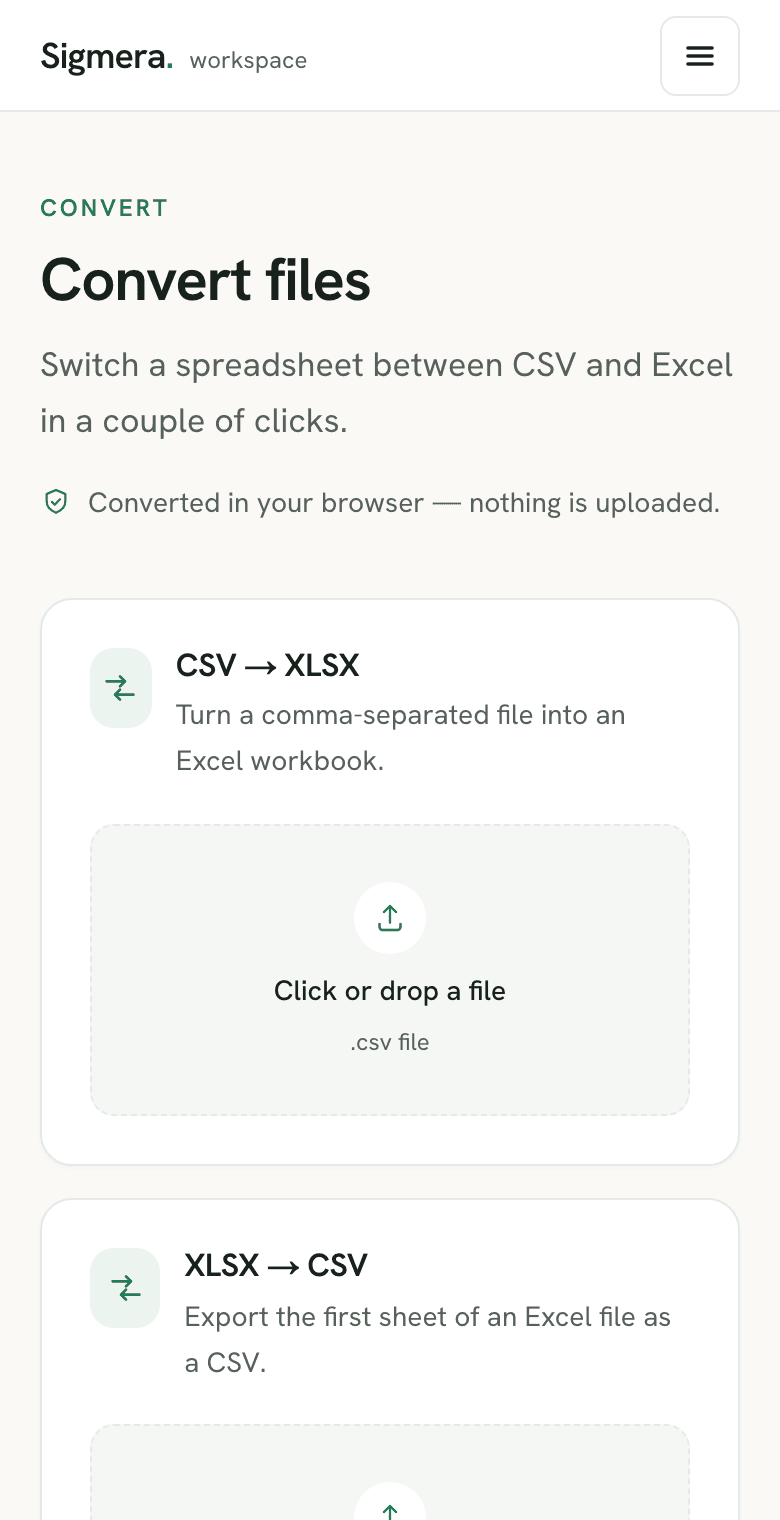
Use the Excel → CSV converter free in your workspace
Free account, no credit card — every tool, unlimited rows, 3 free downloads a month, nothing uploaded.
🔒 Everything runs in your browser — your file is never uploaded, and the workspace even works offline once it has loaded.
How to convert Excel to CSV
- 1. Open the converter in your free workspace. Your workbook is read into the browser’s memory — never sent over the network.
- 2. Drop your .xlsx or .xls file. If it has multiple sheets, choose which one to export.
- 3. Download the CSV. You get a clean, UTF-8 comma-separated file ready for any import.
What changes when you convert XLSX to CSV
CSV is a plain-text format: one sheet, one row per line, values separated by commas. An .xlsx workbook holds much more than that, so a few things are dropped on the way out — the same things Excel itself drops when you use Save As → CSV, which saves only the active sheet and removes all formatting.
- Formulas become values. A cell holding
=SUM(B2:B9)exports as the number it currently shows, not the formula. - One sheet per file. A workbook with several tabs becomes one CSV per tab — pick the sheet you need before downloading.
- Formatting, charts, and colors are dropped. Bold text, cell fills, merged cells, and pivot tables have no CSV equivalent.
- Accents and symbols survive. The export is UTF-8, so
é,ü, and non-Latin scripts come through intact instead of turning into mojibake.
Why an Excel CSV export comes out with semicolons
The most common surprise after an XLSX to CSV export is a file full of semicolons instead of commas. That is a regional setting, not a broken file: Excel writes the Windows list separator, which is a semicolon across most of continental Europe. Microsoft’s own import and export guide describes changing that separator through Windows Region settings — a machine-wide change for one file.
The converter above skips that entirely. It parses the workbook in the page and writes a comma-delimited, UTF-8 CSV every time, whatever your locale is set to, so the same file lands the same way on a colleague’s machine. Two related habits save rework later:
- Check leading zeros before you export. If Excel stored a ZIP code as the number
7430, the zero was gone while it was still a workbook. Format the column as Text first — a CSV can only carry what the cell already holds. - Decide the encoding once. Excel offers both CSV (Comma delimited) and CSV UTF-8, and picking the wrong one is how names with accents arrive as mojibake. The browser export is always UTF-8, so there is nothing to pick.
If the CSV is heading somewhere strict — a CRM, a mail tool, an import wizard — it is worth reading what a CSV file actually stores before you map the columns. If you are still deciding whether to hand over the workbook or the export at all, the CSV vs Excel comparison sets out what each format keeps, what conversion destroys, and which one archives better.
Because those are one-way losses, it is worth cleaning the data while it is still a spreadsheet. If the sheet has repeated rows, the Excel duplicate-removal walkthrough covers the built-in dialog, and once you have a CSV the CSV duplicate remover does the same job in one pass. Going the other direction is just as quick with the CSV to Excel converter. And when the exported rows are going to a reader rather than to another system — a list to print, sign, or attach to an email — the CSV to PDF converter lays them out as a paginated table with the header repeated on every page, so there is no spreadsheet to open and no page setup to configure.
Long order IDs and barcodes that arrive with zeros on the end
This is the loss nobody notices, because nothing errors and the column still looks like a number. Excel has a maximum precision of 15 significant digits, and Microsoft is blunt about the consequence: for any number of 16 or more digits — a credit card number, an IMEI, a long order reference, an EAN-13 with a check digit — every digit past the fifteenth is rounded down to zero. The same page notes that Excel also converts large numbers to scientific notation, so a barcode can reach the CSV as 1.23E+15.
The important part for a conversion: this happens inside the workbook, not during the export. By the time the value is a cell, the trailing digits are already zeros, and no converter can put them back — the original digits are not in the file any more. It is the same one-way loss as a stripped leading zero, but harder to spot, because 4006381333931 becoming 4006381333930 still reads as a plausible barcode.
The fix is upstream and takes one step: format the column as Text before the values are typed or pasted, or prefix an entry with a single quotation mark, and Excel keeps every digit. Then convert. The converter above writes each cell through unchanged, so a column that is text in the workbook is text in the CSV. If the IDs are already zeroed, re-export them from the system they came from — a find-and-replace pass can tidy formatting, but it cannot recover digits that were never stored.
Macro-enabled workbooks convert the same way. A .xlsm file is an ordinary XLSX with a macro project attached, so the converter reads its sheets exactly like an .xlsx and writes the same comma-delimited UTF-8 CSV. The macros are ignored rather than run, which is the safe outcome: a CSV is plain text and cannot carry them.
Convert XLSX to CSV without Excel — Mac, Numbers, Google Sheets
An Excel to CSV converter that runs in the browser has no spreadsheet app behind it, so the operating system stops mattering. The same page converts XLSX to CSV on macOS, Windows, Linux, and ChromeOS, and it does not care whether the workbook was written by Excel, Numbers, LibreOffice, or an export from some other system. That is useful mostly because the native routes each have a quirk:
- Numbers on a Mac splits by table, not by sheet. Apple’s export guide asks you to “choose whether to create a file for each table or combine tables into a single file”, and the text encoding is buried under Advanced Options. A sheet holding three tables can come out as three CSVs you did not expect.
- Google Sheets needs the file in Google first. Its download flow is File → Download → pick a file type, which means uploading the workbook to Google Drive before you can get a CSV out. For a sheet of customer records that is a copy on someone else’s infrastructure for the sake of a format change. The walkthrough on moving CSVs in and out of Sheets covers when that round trip is worth it.
- Excel for Mac writes the same locale-dependent file. Save As → CSV on macOS follows the system region exactly as it does on Windows, so the semicolon problem above is not a Windows bug you can escape by switching machines.
Blank rows and trailing commas in the converted CSV
A common complaint after an XLSX to CSV export is a file that looks right for 400 rows and then carries on for another 40,000 — blank lines, or rows made of nothing but commas. The rows are not invented by the converter. They are already in the workbook, in the range Excel considers used.
Microsoft’s guide to locating and resetting the last cell explains why: “Empty cells may contain formatting that causes the last cell in a row or column to fall outside of the range of cells that contains data.” A fill colour dragged down a whole column, or a border applied to the sheet rather than the table, is enough. Deleting the contents of those cells does not shrink the range — the formatting is still there, and the sheet still ends where it ends.
Check it in one keystroke before you convert. Click any cell and press Ctrl+End (Cmd+Fn+Right on a Mac): Excel jumps to the last cell of the used range. If that lands on row 40,000 when your data stops at row 400, the extra rows will be in the CSV. To clear them, select the row headings below your last record, press Ctrl+Shift+End, then Home → Clear → Clear All. Save, close, and reopen the workbook — Microsoft is explicit that the reset only takes effect on reopen — and Ctrl+End should now land on your real last row. Convert after that and the CSV ends where the data ends.
Blank rows inside the table are a separate problem: the used range is correct, but empty rows sit between real records and travel into the CSV as empty lines. Clear those in the workbook first — deleting blank rows in Excel compares Go To Special, a filter, and Power Query, and flags the partly-empty rows that Go To Special would wrongly remove.
This matters more than it sounds, because most import wizards count those lines. A CRM that reports 40,000 records from a 400-row list, or an importer that refuses the file for exceeding a row limit, is usually reading padding rather than data. If a CSV has already arrived in that state and re-exporting is not an option, open it in the CSV viewer to see where the real rows stop before you send it anywhere.
Check the date column before you export
Dates are the field most likely to arrive wrong at the other end, and the damage happens in the workbook rather than in the CSV. Excel’s default date display, per Microsoft’s date and time formatting reference, “is based on the regional date and time settings that are specified in Control Panel, and changes when you adjust those settings”. A CSV records whatever the cell was showing, so a row that reads 03/04/2026 in London leaves as the 3rd of April and arrives in a US import wizard as the 4th of March. No error is raised — the file is valid, the dates are simply different.
The fix is to remove the ambiguity while the file is still a workbook: format the date column as yyyy-mm-dd, which reads the same in every locale, then export. If a batch has already come out mixed, rewriting the separators across a column is a find-and-replace job — the CSV find and replace tool targets one column at a time so a swap meant for dates does not touch the phone numbers. It is the same order of operations as the checklist for a CRM import: standardize inside the source file, convert once, import last.
Encoding is the other thing a workbook export decides for you. Salesforce requires the CSV it reads to be UTF-8, so a file saved through a non-English Windows locale can load with every accented name corrupted. Converting here writes UTF-8 directly; the rest of what the wizard checks is covered in prepping a customer list for a Salesforce data import.
Frequently asked questions
- Does this tool upload my Excel file?
- No. The Excel-to-CSV conversion runs entirely inside your web browser using client-side JavaScript. Your file is never uploaded to a server, so it is GDPR-safe by design.
- Which sheet gets converted?
- By default the first sheet is exported. If the workbook has several sheets, you can pick which one to convert before downloading the CSV.
- Does it work with old .xls files?
- Yes. Both the modern .xlsx format and the legacy .xls format are supported, and the export is a standard UTF-8 CSV that any tool can read.
- Do I need Excel installed?
- No. The conversion happens in the browser, so you don't need Microsoft Excel or any spreadsheet app installed.
- How do I convert XLSX to CSV without Excel?
- Open the Sigmera converter in any modern browser and drop the .xlsx file in. The workbook is parsed by JavaScript running on your own machine, so you get a CSV back without Microsoft Excel, an install, or an account.
- Why does my CSV lose formulas and formatting?
- CSV is plain text, so it can only store values. Formulas export as the number they currently display, and bold text, colors, merged cells, and charts have no CSV equivalent. Excel's own Save As CSV behaves the same way and saves only the active sheet.
- Will accented characters survive the conversion?
- Yes. The CSV is written as UTF-8, so accented Latin characters and non-Latin scripts come through intact rather than turning into garbled symbols. Set the encoding to UTF-8 when you open the file in a spreadsheet app.
- Why does my CSV have semicolons instead of commas?
- That happens when Excel saves a CSV using the Windows list separator, which is a semicolon in most European locales. Microsoft documents the regional setting that controls it. Converting the XLSX here sidesteps the problem: the browser converter always writes a comma-delimited UTF-8 file, whatever your regional settings say.
- Will leading zeros in ZIP codes or phone numbers survive?
- Only if they survived in the workbook. If Excel stored 07430 as the number 7430, the zero was already lost before the export and the CSV shows 7430. Format the column as Text in Excel first, or keep the values as text, and the converter writes them out exactly as they appear.
- Why do my long order numbers end in zeros after converting?
- Because Excel already changed them. Microsoft documents a maximum precision of 15 significant digits, so for any number of 16 or more digits — a credit card number, an IMEI, a long barcode — every digit past the fifteenth is rounded down to zero, and large numbers are converted to scientific notation like 1.23E+15. That happens in the workbook, before any export, so no converter can restore the missing digits. Format the column as Text before the values are entered, or prefix an entry with a single quotation mark, and every digit survives.
- Can I convert an XLSM macro workbook to CSV?
- Yes. A .xlsm file is a normal XLSX workbook with a macro project attached, so the converter reads its sheets the same way and writes the same comma-delimited UTF-8 CSV. The macros are ignored rather than run — a CSV is plain text and has nowhere to store them. Legacy .xls workbooks are handled too.
- Why did my dates change after the XLSX to CSV export?
- They changed before the export. Excel's date display follows your regional settings, so 03/04/2026 means one thing in the UK and another in the US, and the CSV stores exactly the string that was on screen. Format the column as yyyy-mm-dd in the workbook first — that order reads the same everywhere — then convert.
- Can I convert a workbook with several sheets to CSV at once?
- A CSV holds one table, so each sheet becomes its own file. Convert the workbook once per sheet by picking a different sheet each time. Numbers on a Mac does the same thing at the table level and can emit several CSVs from one document.
- Can I convert XLSX to CSV on a Mac without Excel?
- Yes. The converter runs in the browser, so macOS needs no Microsoft Excel and no Numbers install. Drop the .xlsx file into the page and the workbook is parsed on your own machine — there is nothing to install and nothing uploaded.
- Why does my CSV have thousands of empty rows or trailing commas?
- Because the workbook thinks those cells are in use. Excel saves the range that contains data or formatting, and Microsoft notes that empty cells may carry formatting that pushes the last cell beyond the real data. The export writes that whole range, so the CSV picks up blank lines and rows of bare commas. Press Ctrl+End in Excel: if it lands far below your last record, select the rows underneath, Clear All, save, close, and reopen before converting.
- Does converting XLSX to CSV make the file smaller?
- Usually, yes — a CSV drops formatting, formulas, charts, and the XML scaffolding an .xlsx carries, keeping only the values. The exception is a workbook with an inflated used range, where the export can be larger than expected because it writes out every empty row inside that range.
- What happens to cells that contain commas, quotes, or line breaks?
- They are quoted, not split. The CSV format spec, RFC 4180, says fields containing commas, double quotes, or line breaks should be enclosed in double quotes, and a double quote inside such a field is escaped by doubling it. The converter follows that rule, so an address like 12 High St, Leeds stays one column in the XLSX to CSV output instead of spilling into the next.
- Are hidden or filtered-out rows included in the CSV?
- Yes. The converter reads the cells stored in the sheet, not the view on screen, and the spreadsheet library it uses renders all rows and columns by default — hidden ones included. A row that a filter is currently hiding is still in the workbook, so it is still in the CSV. Delete those rows, or copy the visible rows to a new sheet, before converting if you want them out.
- How do I convert a CSV back to Excel?
- Use the CSV to Excel converter at /tools/convert-csv-to-excel. It reads the CSV in your browser, detects the delimiter and encoding, and downloads a ready-to-open .xlsx workbook.