Clean and format phone numbers in a spreadsheet
To clean phone numbers in a CSV, open the phone-number cleaner in Sigmera, pick the default country for numbers that lack a code, and Sigmera normalizes the phone column to the E.164 standard (+14155550100). Preview the formatted numbers, then download the cleaned file. Everything runs in your browser — your data is never uploaded, so it’s GDPR-safe by design.
Last updated: October 2026
Use the phone-number cleaner free in your workspace
Free account, no credit card — every tool, unlimited rows, 3 free downloads a month, nothing uploaded.
🔒 Everything runs in your browser — your file is never uploaded, and the workspace even works offline once it has loaded.
Ways to format phone numbers, compared
| Method | Data uploaded? | Handles E.164 | Skill needed |
|---|---|---|---|
| Sigmera (this tool) | No — runs in browser | Yes, automatically | None |
| Excel formulas | No | Only via nested formulas | High (formulas) |
| Manual editing | No | Error-prone | Low (but slow) |
| Python / phonenumbers | No | Yes | High (code) |
How to clean phone numbers
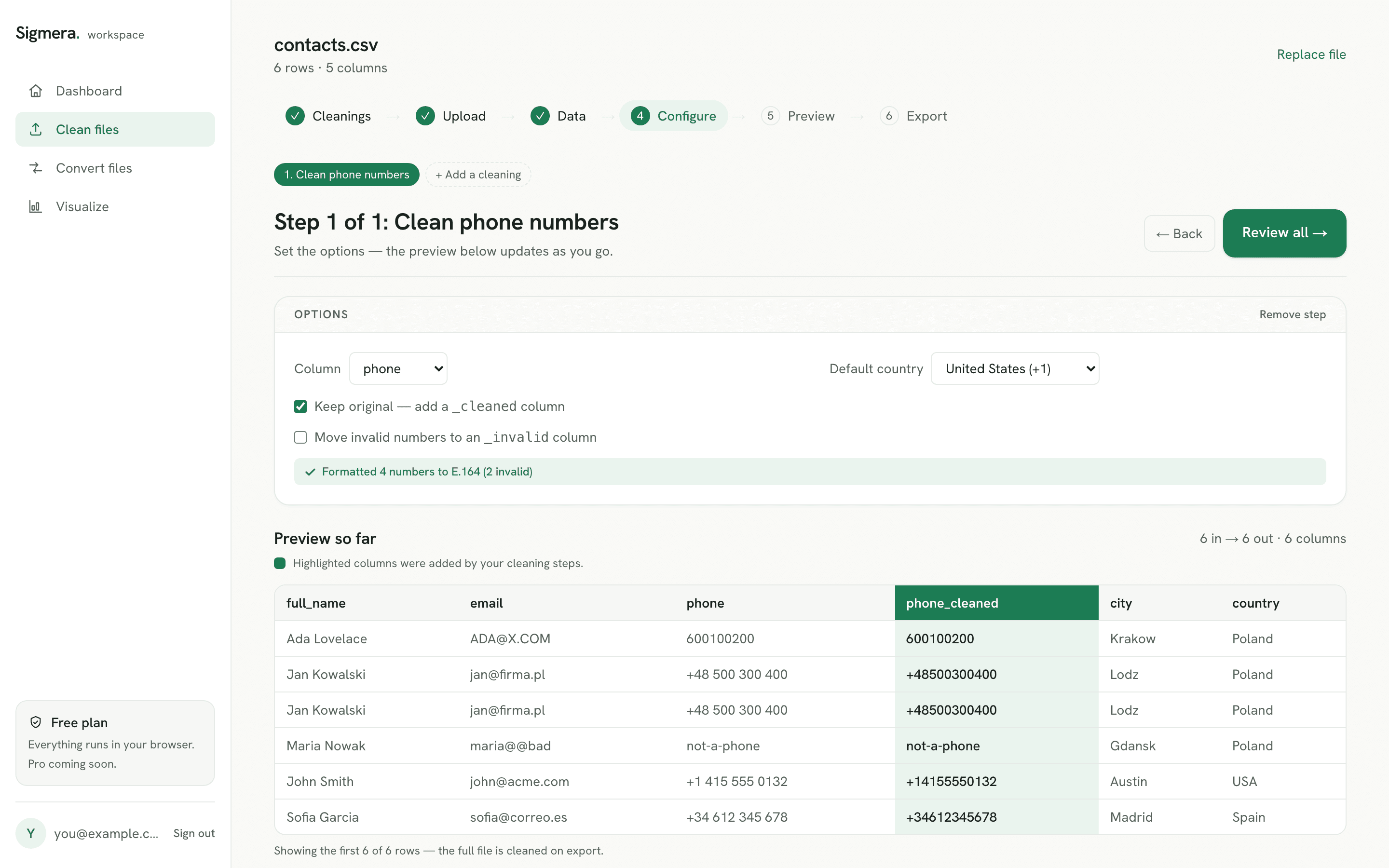
- 1. Drop your CSV into the tool. The file is read into your browser’s memory — it is never sent over the network. Sigmera auto-detects the phone column.
- 2. Pick the default country. Numbers that already start with a plus sign or an international 00 prefix keep their own code; everything else gets the calling code you choose.
- 3. Preview the formatted numbers. See how many numbers were normalized to E.164 and how many were flagged invalid before you commit. You can re-pick the phone column if auto-detect guessed wrong.
- 4. Download the clean file. Create a free account to export the full CSV with phone numbers in E.164 format.
Why format to E.164 client-side?
E.164 is the ITU international numbering standard — a plus sign, the country calling code, then the national number, with no spaces or punctuation. CRMs, SMS gateways, and dialers reject inconsistent formats, so a single column of mixed numbers breaks imports. Most online formatters fix this by uploading your contact list to a server you can’t see. Because Sigmera processes the file locally with the browser’s built-in JavaScript engine, there is no server to upload to and nothing is stored — which satisfies GDPR data-minimization (Article 5) because zero bytes leave the device. The rules themselves — country codes, trunk zeros, the 15-digit ceiling — are set out row by row in what the formatter does to each row below.
What the phone number formatter does to each row
A phone number formatter is worth using only if you can predict its output. Sigmera applies four rules, in order: keep an existing country code, convert an international 00 prefix to a plus sign, drop a single national trunk zero, and delete every space, dash, bracket, and dot. Anything left that cannot become a valid number is flagged rather than guessed at. Here is how to format a phone number under each rule:
| Raw value | Default country | E.164 result | Rule applied |
|---|---|---|---|
| (415) 555-0100 | United States (+1) | +14155550100 | Stripped the parentheses, space, and dash, then prepended the +1 calling code. |
| 020 7183 8750 | United Kingdom (+44) | +442071838750 | Dropped the leading trunk zero, then prepended +44. |
| 0044 20 7183 8750 | any | +442071838750 | Recognized the international 00 prefix and converted it to a plus sign. |
| +1 415-555-0100 | any | +14155550100 | Kept the country code it already had and removed the separators. |
| 555-0100 | United States (+1) | flagged invalid | Too few digits to be a valid national number — flagged in the preview instead of guessed at. |
The 15-digit ceiling in the last rule is not ours — it is the limit set by the ITU-T E.164 numbering plan, and platforms such as Twilio reject anything longer. One caveat worth knowing before you reach for a spreadsheet instead: Excel’s built-in Special > Phone Number option only changes how a number is displayed. The stored value never moves, so the CSV you export still holds the messy original. A formatter that rewrites the value is the difference between a clean import and a failed one — the same reason it pays to standardize the email column and drop duplicate rows in the same pass — the rest of the data cleansing tools run on the same file without reloading it. See the full comparison of phone-formatting tools if you want to weigh the alternatives, or the walkthrough for when you import a CSV to HubSpot and need every phone value to survive the mapping step. Recruiters hitting the same problem on an applicant export can follow preparing candidate data for an ATS instead, where the phone column is formatted after the applicant list has been deduplicated.
Where the formatted numbers land in your file
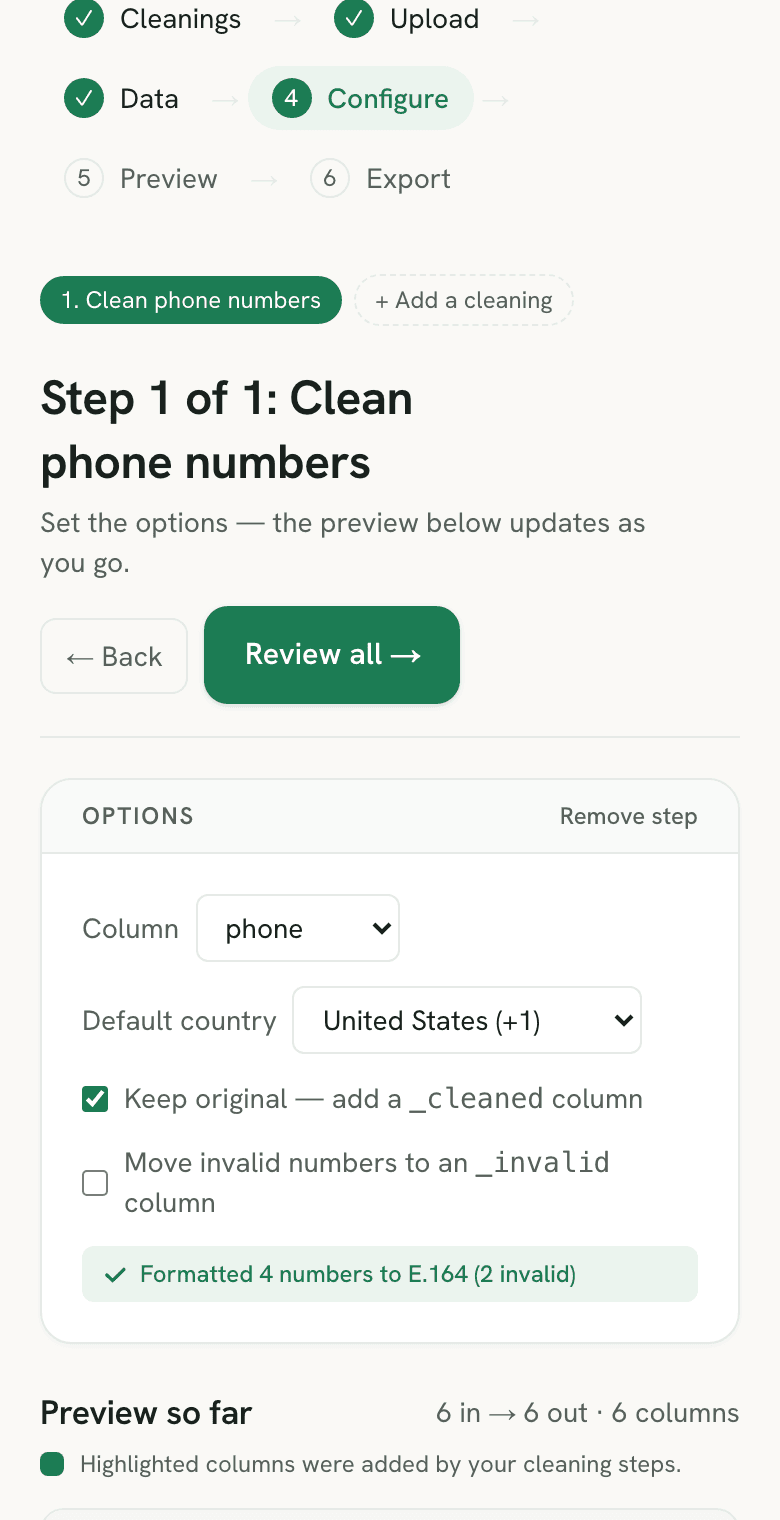
The formatter does not overwrite your phone column unless you ask it to. With the default settings it adds aphone_cleaned column immediately to the right of the source (the name follows your header, so mobilebecomes mobile_cleaned) and writes the E.164 result there. A number it cannot validate is copied across unchanged, so the two columns sit side by side and you can read every change row by row before you export.
Two options change that layout. UntickKeep originaland the result replaces the source values in place — the shape most CRM importers want, once you trust the output. TickMove invalid numbers to an _invalid columnand the failures are split out instead: the cleaned column holds only valid E.164 numbers, and each rejected value moves to aphone_invalid column on the same row. With both options ticked on a US default, three rows come out like this:
| phone (original) | phone_cleaned | phone_invalid |
|---|---|---|
| (415) 555-0100 | +14155550100 | |
| 555-0100 | 555-0100 | |
| +44 20 7183 8750 | +442071838750 |
The split version is usually the one to import: an empty phone cell imports as a contact with no number, while a malformed one depends on how strictly the importer validates the field. The _invalid column then doubles as a fix list — sort the file on it and the rows that need a human are grouped together. If the same file also carries an email column, theemail cleaner uses the same layout, with a _cleaned column and an optional_invalid one, so both fixes read the same way.
Formatting a phone column that mixes countries
The default country is a fallback, not an override. A list built from several markets usually holds three kinds of row at once, and the phone number formatter treats each one differently:
- Rows that already carry a country code. Anything starting with
+or00keeps the code it came with. Setting the default to the United States does not rewrite a German number as American — it only decides what to do with rows that say nothing about their country. - Bare national numbers. These have no country in them at all, so the only honest options are to assume one or to flag them. Pick the default that matches where most of the bare rows came from, run it, then filter for the rest.
- Rows that cannot be valid for the default. A number that is too short or too long for the calling code you picked is flagged instead of padded or truncated, which is what tells you the default was wrong for that slice of the file.
For a genuinely mixed list, the reliable method is to sort or filter by country first, run the column once per group, and treat the flagged count as the signal that a group still needs its own pass. The step-by-step version of that workflow is in the guide to normalizing a phone column in a CSV, and the wider background — trunk prefixes, the 00 prefix, why a spreadsheet silently eats a leading zero — sits in the formatting and verification guide below. Numbers that came out of a spreadsheet are worth a second look before you start, because a phone column stored as a number has already lost its plus sign and its leading zeros; reopening the file with the Excel-to-CSV converter keeps the column as text so there is something left to format. If you need to look at the CSV in Excel first, import it with the phone column set to Text rather than double-clicking the file.
Countries the phone number formatter covers
The default country is what a bare national number falls back to, so the list below is only relevant to rows that carry no calling code of their own. Anything already written with a + or an international 00 prefix is formatted correctly no matter which default is selected.
| Default country | Calling code |
|---|---|
| United States | +1 |
| Canada | +1 |
| United Kingdom | +44 |
| Poland | +48 |
| Germany | +49 |
| France | +33 |
| Spain | +34 |
| Australia | +61 |
| India | +91 |
| Other (custom) | Enter any calling code, plus an optional national digit count |
The Other (custom) row is the escape hatch for a market that is not listed: give it the calling code, and optionally the number of national digits you expect, and rows of the wrong length are flagged instead of accepted. That matters because validity is per-country, not a single global rule — national number length varies by country under the ITU-T E.164 plan, which is why Sigmera parses each value against the selected country rather than pattern-matching digits. A ten-digit string that is a valid US number is not automatically a valid German one, and the preview says so instead of emitting a plausible-looking wrong number.
Formatting a number is not the same as verifying it
A phone number formatter changes the shape of a value, not its truth. When a row comes out as E.164, it means the string is structurally valid for the country the formatter was told to assume — the right calling code, a plausible national digit count, no stray punctuation. It does not mean a person answers that line. Twilio draws the same boundary in its Lookup API: the basic response reports whether a number sits in a range a carrier is allowed to assign, while whether the line is actually reachable comes from a separate, paid data package.
So read the preview as two different signals. Flagged rows are broken now and are your worklist before the import. Formatted rows are import-safe, which is not the same as contactable. If a campaign depends on the number reaching someone, run a verification service after the format pass rather than before it — most verification APIs expect E.164 on the way in and reject the messy original, so normalizing first is what makes the check possible at all. The same ordering applies to the rest of the file when you clean a customer list before a CRM import: fix the format, then judge the data.
Phone formatting, validation and verification
Phone-number formatting gives a contact list one consistent representation. E.164 uses a plus sign, country code and national number, with at most 15 digits. Formatting and number-plan checks do not establish that a number is assigned, reachable or owned by your contact.
- Keep phone values as text. A spreadsheet that has already removed a leading zero or rounded digits cannot be repaired by applying a display format afterwards.
- 020 7946 0958 needs UK context to become +442079460958. Do not guess a country for a genuinely mixed list; separate known regions and review unresolved rows.
- E.164 storage uses a leading + followed by digits only, at most 15 digits excluding the plus. International dialing prefixes such as 00 or 011 are not part of the stored number. A regex checks the shape, not whether the number exists.
- National prefixes follow the country's numbering plan. The UK example drops its national trunk zero; Italian fixed-line numbers retain their leading zero. Do not apply a global delete-leading-zero rule.
- Normalize phone values before using them as a duplicate key. Keep the original column for review; formatting alone cannot safely identify which of two contacts should survive.
- Keep extensions in their own field. An extension is not part of the international number, and stripping all punctuation before understanding the input can join unrelated digits.
Choose the method that fits your task
- Sigmera
- One contact file, a known default region and a reviewable E.164 result. No live carrier lookup or proof that the recipient can receive calls.
- Excel or Google Sheets
- Known-country values and predictable display rules. A display mask does not turn a local number into a valid international one.
- A phone library or lookup service
- Programmatic parsing or live network information. A library needs code; an external lookup transmits numbers and may charge per request.
Frequently asked questions
- Does this tool upload my CSV file?
- No. The phone-number formatter runs entirely inside your web browser using client-side JavaScript. Your file is never uploaded to a server and never leaves your device, so it is GDPR-safe by design.
- What is the E.164 phone format?
- E.164 is the international telephone numbering standard published by the ITU. An E.164 number starts with a plus sign and the country calling code, followed by the national number, with no spaces, dashes, or parentheses — for example +14155550100. It is the format CRMs, SMS APIs, and dialers expect.
- What about numbers without a country code?
- Pick a default country before running. Any number that has no leading plus sign and no international 00 prefix is treated as a national number: Sigmera strips a single leading trunk zero and prepends the calling code you selected, producing a valid E.164 number.
- Can I do this in Excel instead?
- Yes, but it is painful. Excel has no built-in E.164 formatter, so you stack SUBSTITUTE, TEXT, and CONCAT formulas to strip symbols and add the country code, and numbers stored as text break easily. Sigmera normalizes a whole column to E.164 in two clicks without writing a formula.
- Does a phone number formatter change the number or only how it looks?
- It depends on the tool. Excel's Special > Phone Number option is a display format — it shows 5555550100 as (555) 555-0100 while the stored value stays unchanged, so an export writes the raw digits back out. Sigmera's phone number formatter rewrites the value itself, so the E.164 string is what lands in the downloaded CSV and what your CRM reads.
- How many digits can an E.164 phone number have?
- Fifteen, counting the country code and excluding the leading plus sign. That ceiling comes from the ITU-T E.164 numbering plan, and it is why anything longer is rejected by SMS gateways and dialers. Sigmera flags numbers that exceed it rather than truncating them.
- How do I format a phone number column before a CRM import?
- Normalize every row to the same E.164 shape first, then import. Open your CSV in Sigmera, choose the default country for numbers without a code, check the preview count of formatted versus flagged rows, fix the flagged ones, and download. A single consistent format is what stops CRMs from rejecting rows or creating duplicate contacts.
- How do I format phone numbers from different countries in one file?
- The default country only applies to rows that carry no country code of their own — a number that already starts with a plus sign or an international 00 prefix keeps its own code, so picking a default never rewrites a foreign number as a domestic one. For a list where the bare national numbers come from several markets, filter by country, run the column once per group, and use the flagged count as the signal that a group still needs its own pass.
- Which countries does the phone number formatter support?
- The default-country picker lists the United States, Canada, the United Kingdom, Poland, Germany, France, Spain, Australia, and India. Those defaults only decide what to do with bare national numbers, so a file full of numbers that already carry a plus sign and a calling code formats correctly whichever default is selected. For a market that is not in the list, choose Other (custom), enter the calling code, and optionally give the national digit count you expect so wrong-length rows get flagged.
- What does the formatter do with blank or unparseable cells?
- It leaves them exactly as they are. A blank cell stays blank and a value that cannot be parsed as a real number keeps its original text — nothing is padded, truncated, or replaced with a guess. Both simply count as not formatted in the preview, so the flagged total is your worklist rather than a set of silently corrupted rows.
- Does a formatted phone number mean it is real and working?
- No. Formatting proves shape, not truth. An E.164 result means the digits are structurally valid for the country the formatter assumed — correct calling code, plausible national length, no stray punctuation — and nothing more. Twilio's Lookup API splits the two the same way: its basic response says whether a number falls in a range a carrier can assign, while knowing the line is reachable requires a separate paid data package. Normalize the column first, then run a verification service if the campaign depends on the number connecting.
- How do I format phone numbers in Google Sheets?
- Google Sheets number formatting controls how a value is displayed, so a custom format makes the column look consistent while the stored value stays as it was — and an export writes the original back out. To change the value itself in Sheets you have to stack SUBSTITUTE or REGEXREPLACE formulas for each rule: strip separators, drop the trunk zero, prepend the calling code. Exporting the sheet as a CSV and running the column through Sigmera's phone number formatter does the same work without formulas, and the E.164 string is what lands in the downloaded file.
- Does the phone number formatter overwrite my original phone column?
- Not unless you tell it to. By default the formatted numbers go into a new column named after the source — phone_cleaned next to phone — and the original values stay beside it. Untick Keep original to write the E.164 result over the source column instead. Tick Move invalid numbers to an _invalid column and every number that fails validation is moved into its own column, leaving the cleaned column holding only valid E.164 numbers.
- What happens to extensions like x123?
- An E.164 number is a plus sign followed by digits only, so there is nowhere in it to put an extension. Sigmera strips the extension and the letters around it while formatting the main number, and flags the row if what remains is too short or too long to be valid. Keep extensions in a separate column if you need them — most CRMs and dialers store them in their own field anyway.